Squarespace SEO for service-based businesses: What actually matters in 2026
Every Squarespace SEO guide on the internet will tell you the same things: fill in your meta descriptions, add alt text, use keywords in your headings. And yes, all of that matters. But if that's all you needed to know, you wouldn't still be searching, or asking AI how to fix your SEO.
This post is for service businesses, the coaches, consultants, designers, therapists, photographers, retail store owners and anyone who built their site on Squarespace and want to understand what's actually limiting their search visibility, not just what boxes to check.
I'm a Squarespace designer, not an SEO agency and what I've learned is that a lot of the SEO problems service businesses run into aren't content problems or keyword problems, they're design problems, baked in from the start.
Is Squarespace bad for SEO?
No. But it's also not neutral.
Squarespace handles the technical basics for you automatically: it generates a sitemap, creates clean URLs, applies canonical tags, and forces HTTPS. For a service business that doesn't have a developer on staff, that's genuinely valuable. You're not starting from zero.
Where Squarespace creates friction is in the areas it doesn't automate: structured data (schema markup), page speed on image-heavy builds, and the fact that every template ships with the same global navigation and header structure, which means your site architecture defaults to what Squarespace decided, not what makes sense for how people search for what you do.
The honest answer: Squarespace is fine for SEO if your site is well-designed to begin with. Most are not.
So, what does Squarespace do automatically for SEO?
Out of the box, Squarespace handles:
XML sitemap generation and automatic Google submission
Canonical tags to prevent duplicate content issues
301 redirects when you change a URL slug (if you set it up correctly in the URL mapping)
Clean, readable URLs without session IDs or random strings
SSL certificate (HTTPS) on all pages
Mobile responsiveness on all templates (though you need to go over the mobile design to make sure it looks good)
These are real advantages over a DIY WordPress build where someone forgot to install Yoast. For a service business, these fundamentals being handled means you're competing on content and authority and not technical hygiene.
What are Squarespace's actual SEO limitations?
That said, here are a few things I think Squarespace still lacks in.
Schema markup is manual and limited. Google uses structured data to understand what your page is about. Whether you're a local business, a service provider, a product, an article. Squarespace doesn't add this automatically. For service businesses, the most valuable schemas are LocalBusiness, Service, and FAQ. You can add them via code injection (Settings → Advanced → Code Injection), but most Squarespace site owners don't know this exists, and most templates don't include it.
Page speed depends heavily on how you build. Squarespace loads cleanly on empty templates. But the moment you add full-width background videos, stacked image sections, and custom fonts(which every beautiful Squarespace site has) you can tank your Core Web Vitals. Google uses page speed as a ranking signal, and a site that scores 45 on mobile PageSpeed Insights is competing with a handicap. This is a design decision, not a platform limitation.
You can't edit robots.txt. On Squarespace, you can't customize which pages search engines crawl. This matters less for most service businesses, but it's a real constraint if you have pages you'd rather not index.
Blog URL structure is fixed. Every blog post lives at /blog/your-post-title. You can't change this structure. If you wanted posts in a subfolder that reflects your content categories (like /services/squarespace/your-post), that's not possible.
Why do service business websites rank differently than product sites?
Because the search intent is different and most SEO guides are written for e-commerce.
When someone searches "buy minimalist candle holder," Google is confident about what they want. When someone searches "Seattle brand designer," they might want a portfolio to browse, a pricing page, a blog post about what brand design costs, or a case study. The intent is mixed, and Google has to guess.
For service businesses, the pages that tend to rank are:
Specific service pages that name exactly who you serve and what you do (not "Services" but "Squarespace Website Design for Coaches")
Location pages that combine your service with a geography, even if you work remotely
Content that answers a specific question your ideal client is searching right before they decide to hire someone
The mistake most service businesses make is spending energy on their homepage and about page. These pages are hard to rank because they're broad. The focus should be on your FAQs and Service pages. A lot of business owners completely skip adding pages for a specific service or adding location pages that would actually drive qualified traffic.
What SEO settings in Squarespace actually matter?
The settings that move the needle, in order of importance:
Page titles and meta descriptions.Meta description is what the search engines will show when displaying your website in search results.
Make sure you add a simple description that incorporates keywords and provide a concise overview of your website's content.
Go to each page → gear icon → SEO tab.
Your page title is what shows in Google results. Write it for the searcher, not for yourself. "Squarespace Website Designer | Brand Unpuzzled" is less effective than "Squarespace Website Design for Women-Owned Service Businesses | Seattle."
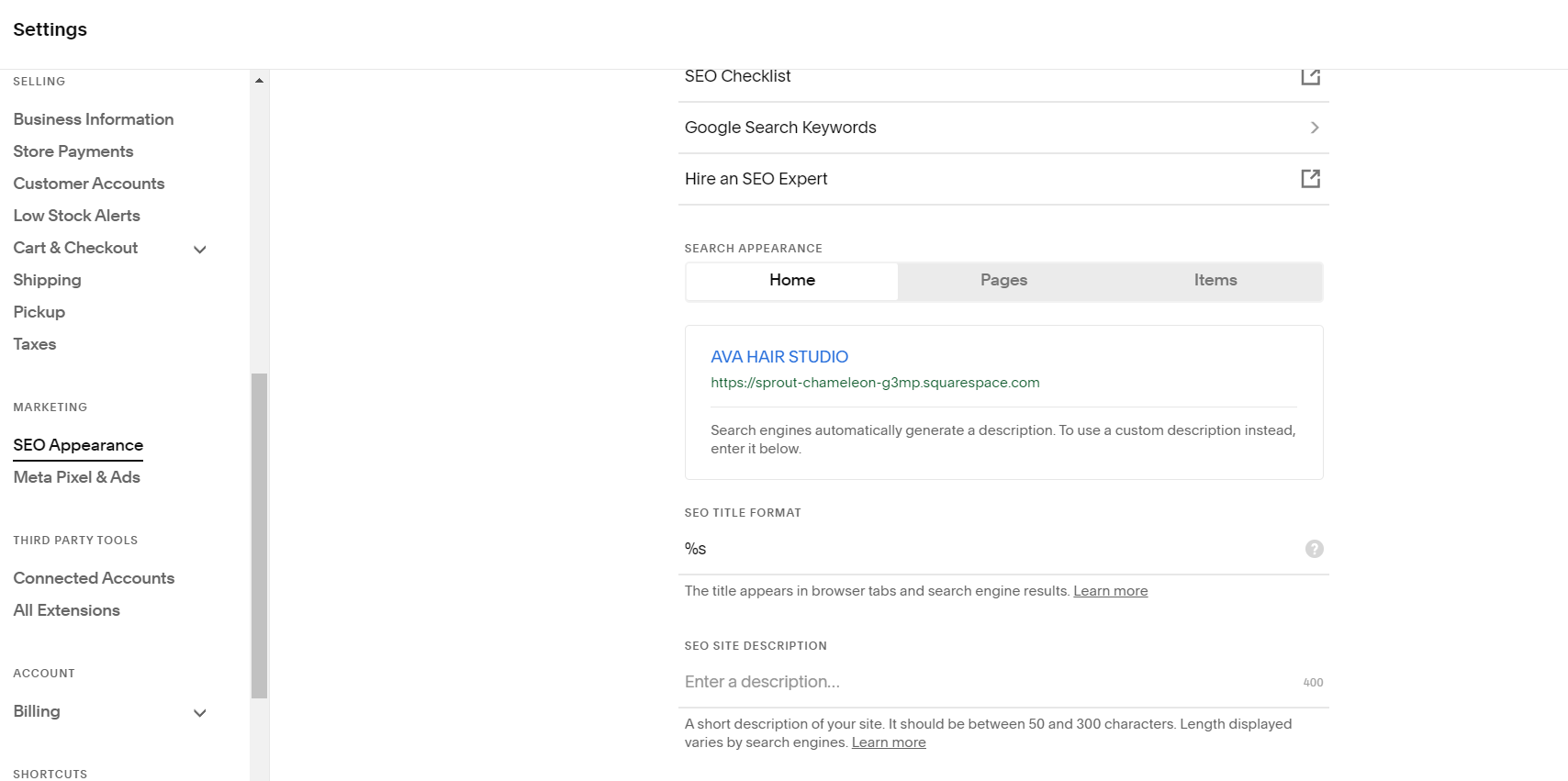
Add your Meta description under SEO SITE DESCRIPTION in the SEO Appearance dashboard
Your blog post SEO titles.
Separate from the post title your readers see. Use this to put your target keyword at the front. If your post is called "5 Things I Wish I Knew Before Launching My Squarespace Site," the SEO title might be "Squarespace Website Launch Checklist: 5 Things Most Designers Miss."
Alt text on every image.
Not "image1.jpg." A description of what's in the image that also reflects what the page is about. For a portfolio page: "Custom Squarespace website designed for Seattle life coach, Dr. Shreya Kulkarni."
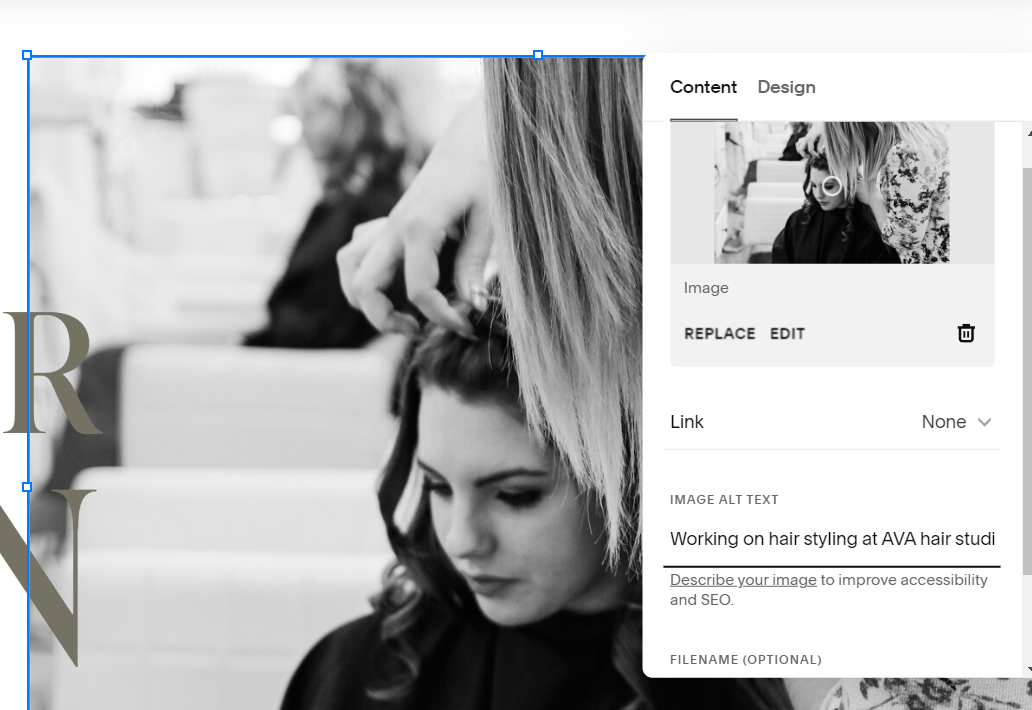
Add alt text under IMAGE ALT TEXT to describe the image for search engines
Connected Google Search Console.
Squarespace has a native integration for GSC. Connect it. This tells you which queries are bringing people to which pages, so you stop guessing.
The settings that don't matter as much as people think: Squarespace's built-in "keywords" field (this is not used by Google), social share images (affects social, not search rankings), and the URL slug as long as it's clean and readable.
Why does my Squarespace site load slowly?
Usually one of three reasons:
Background videos. Squarespace autoloads video sections even on mobile. If you have a hero section with a background video, that video is loading whether or not the visitor can see it. This is one of the most common causes of poor mobile performance on Squarespace sites.
Unoptimized images. Squarespace does apply some compression, but if you're uploading 4MB photos from your camera roll, you're fighting against their compression. Export images at 2x the display size, compressed to under 300KB before uploading.
Too many third-party scripts. HoneyBook embeds, Tidio chat widgets, Google Tag Manager, Pinterest tags, every script added through code injection blocks the page from loading until it finishes. Audit what's actually running on your site.
Page speed isn't just a ranking factor. A service business site that loads slowly on mobile loses the client before they read a single line of your copy.
Can Squarespace rank in AI search results?
This is the question more service businesses should be asking in 2026.
The answer: it depends on how you’re creating your content.Google's AI Overviews, ChatGPT, and Perplexity pull content from sites that are clearly structured, directly answer specific questions, and are considered authoritative for a topic. The platform your site is built on matters less than whether your content is easy for AI to parse.
How can you make your Squarespace content AI-citation-friendly:
Clear H2 questions that match how someone would ask something aloud ("Does Squarespace hurt SEO?", “What does a life coach do?”)
Direct, quotable answers, one or two sentences that can stand alone without the surrounding context
FAQ sections on service pages, written in natural language
Specific claims with detail, not vague generalities. Here’s where you showcase your experience. "Squarespace loads a sitemap automatically" is citable. "Squarespace is great for SEO" is not.
For local service businesses, AI results are increasingly pulling from Google Business Profile data first, which means your GBP, not just your website, is what gets surfaced when someone asks an AI "who's a good brand designer in Seattle." So if you’re a local business without Google Business Profile setup, I’d recommend making it your first priority.
What SEO problems are actually design problems?
This is the part most guides and business owners skip.
If your website has any of these, the fix isn't adding keywords, it's rethinking the design strategy:
01. One page doing too many jobs.
A homepage that tries to speak to coaches, e-commerce brands, and nonprofit clients will rank for none of them. Google can't tell who you're for. The solution is separate service pages, each written for a specific audience.
02. No clear content hierarchy.
If every heading on your site is the same visual size and weight, Google can't tell what's most important. H1, H2, H3 have semantic meaning, not just visual styling.

Organize your content easily via the multiple heading options in Squarespace
03. Portfolio pages with no text.
Beautiful image grids don't rank. A case study page that describes who the client was, what the challenge was, and what you built/did to help them improve their business, that ranks, and it converts better too.
04.Service pages that describe the process instead of the outcome.
"We start with a discovery call, then move to brand strategy, then design..." tells Google what you do procedurally. "Squarespace website design for therapists who want to attract clients without feeling like they're performing" tells Google who you serve and what they get.
The one thing that would improve most Squarespace service sites
Create one specific service page for your most valuable client type, written entirely for that person, with their language, their search terms, and a clear answer to “why you." For example, for my business I have build specific pages for Squarespace Website Design for Health Coaches and Squarespace Website Designe For Authors
You can keep your service page, but the niche pages are the one that tell Google exactly what you do (and exactly what to rank you for). Build these pages with real copy, a case study embedded, a FAQ section, and a CTA that makes it obvious what happens when they click.
Most service business sites have a homepage, an about page, a portfolio, and a contact form. That's not enough surface area for Google to understand what you do for whom.
If you've read this and realized your site's SEO issues start with how it's structured, that's usually a design conversation, not a content one.
If you're a coach, therapist, or service-based founder who'd rather have the SEO handled than spend time on it yourself, here's how I work with clients.
About me:
Hi I’m Aneet. I’m a website designer based in Seattle, WA. My love for design & code is only matched by my appreciation of classic novels, history, and music from eras before I was born (maybe I’m an old soul). I love solving problems through strategy, design or code and love 1:1 conversations that make you lose track of time. If you want to connect feel free to reach out on Instagram @brandunpuzzled (Instagram is where I hang out, at least on DMs!). Thank You for stopping by :)
Read next:
→ How to Make Your Website AI-Ready in 2026
→ How Much Does a Squarespace Website Cost?
→ Ready for a site built with SEO baked in? See our website design services.
If you'd like more pieces like this, you can subscribe to the journal. New essays, in depth analysis on all things technology, design and business. Roughly once a month.
Join the list →